


2.5.1 Getting Started with Discussion Forums
You must take a few simple steps in order to get started with discussion forums.
- At least one forum must be created
on the server. How to do this is explained in Creating a Forum.
- The actual discussions take place in newsgroups, and thus one or
more Newsgroups must be created in the Forum. How to do this is explained in
Creating a Newsgroup.
You
can insert a forum into any collection on the server where you have appropriate
access permissions. A forum is created
as follows:
- Log in to the server by clicking on Login.
- Click on Authoring to switch to authoring mode.
- Navigate to the collection where you want to insert the new forum
- Select Publish->Forum. The New Forum dialog box appears
(see Figure 81).
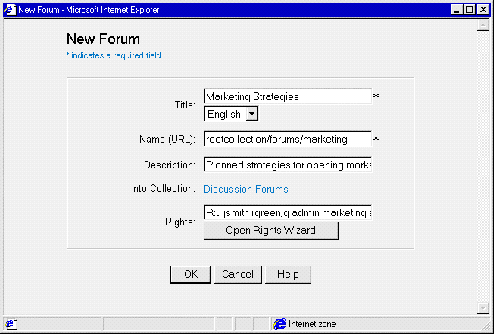 Figure 81: New Forum dialog box
- Specify a Title for the discussion forum. Select the appropriate
language from the list. This title will appear in the collection listing.
- Enter a unique Name attribute for the forum.
- Optionally enter a Description for the forum.
- Optionally change the value of the Rights attribute.
- Click on the OK button. The new forum appears in the collection
hierarchy on the server.
To
conduct a discussion, a newsgroup must be inserted into a forum on the server.
Newsgroups
are created as follows:
- Log in to the server by clicking on Login.
- Make sure you are not in Authoring mode.
- Navigate to the forum where you want to add a new newsgroup. Click on the
forum. The dialog box in Figure 82 appears.
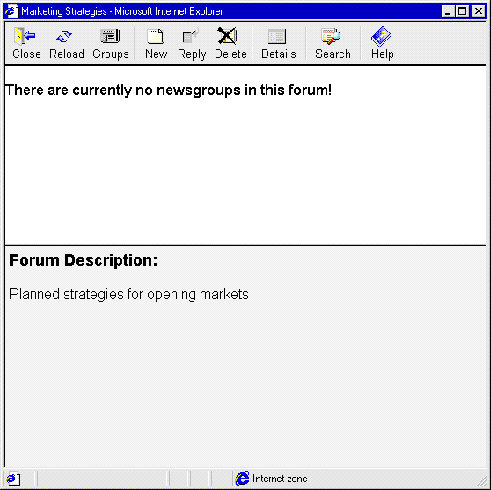 Figure 82: Forum dialog box
- Click on the New icon in this window. The dialog box in Figure 83
appears.
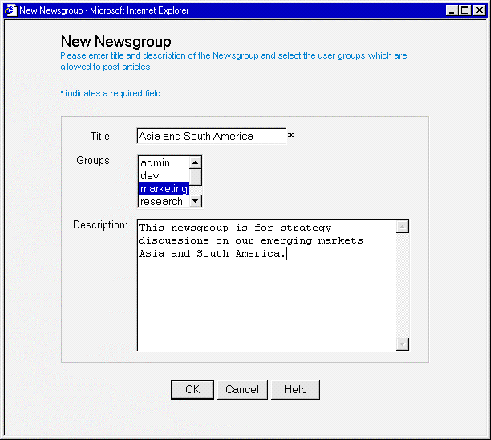 Figure 83: New Newsgroup dialog box
- Specify a Title for the newsgroup.
- Select the group or groups that are to have permission to participate in
the newsgroup.
- Enter a Description for the newsgroup.
- Click on the OK bu
tton.
The newsgroup is created.
